
- August 9, 2026
- 0 Comments
SEE IT. STRESS IT. THEN BUILD IT.
A working guide to rendering and simulation — two very different ways of building a part before it exists, and why Amorphous runs both before anything reaches a machine.
1. Two Different Kinds of “Before It’s Real”
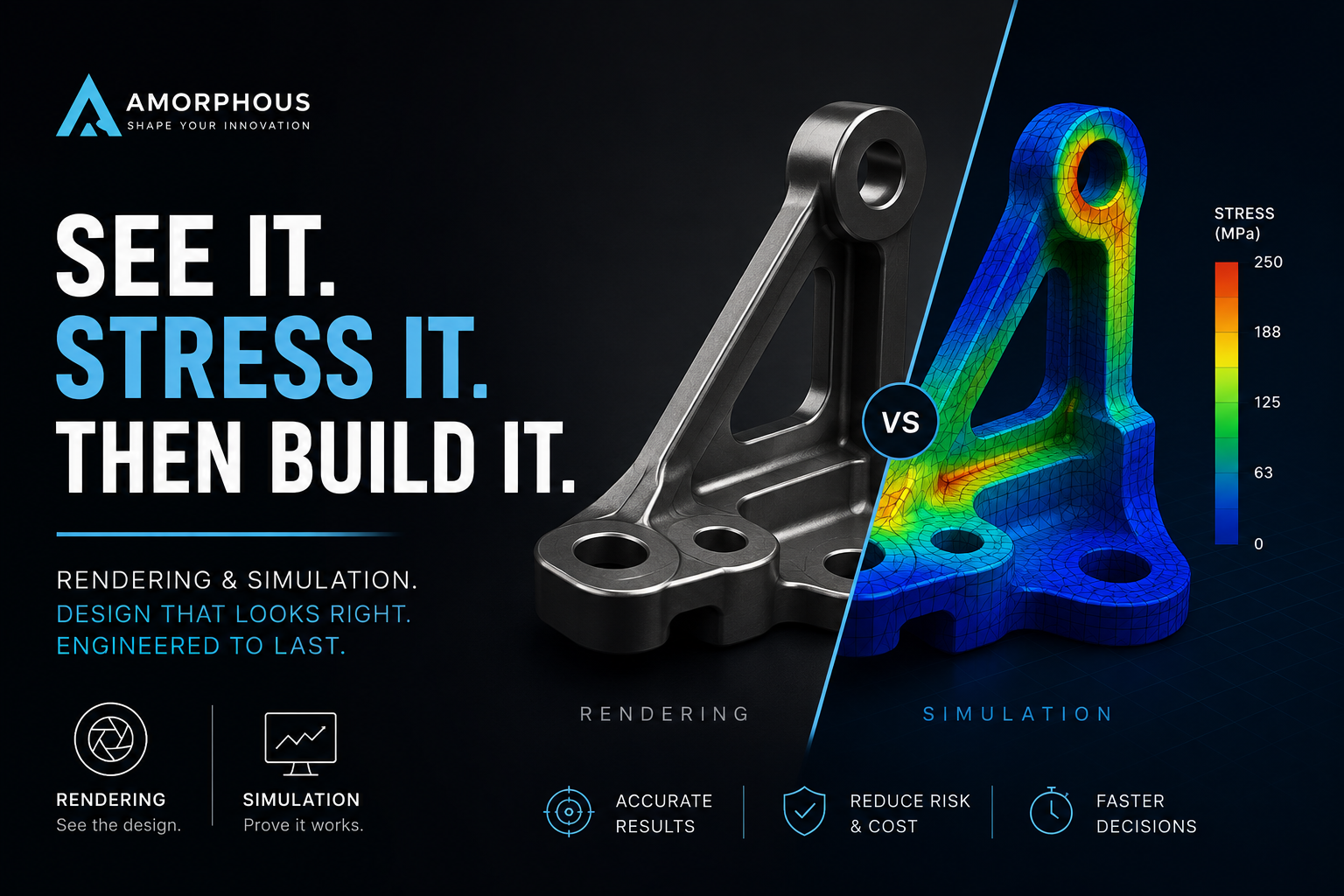
Rendering and simulation both create a virtual version of a part before it’s built, but they answer completely different questions. Amorphous uses rendering to show what a design looks like — materials, lighting, finish, how it sits in someone’s hand — and simulation to show what it survives — load, heat, vibration, fatigue. One sells the idea. The other proves it.
Confusing the two is a common mistake outside engineering circles — a beautiful render says nothing about whether a bracket will crack, and a stress plot says nothing about whether a client will like the product. Amorphous keeps them as separate steps with separate goals, then brings the results back together before a part ever goes to tooling.
.
2. How Amorphous Renders a Design
A render is only as good as the model behind it. Amorphous follows the same sequence on every project, from a client-facing product shot to an internal design review.
- Start from a clean CAD model — Amorphous carries the surfacing straight out of Design, since a render can’t hide a rough or unfinished model, only expose it.
- Assign real materials — Amorphous maps actual finishes — brushed aluminum, molded ABS, soft-touch coating — referencing the Material Guide so the render matches what production will actually deliver.
- Light and stage the scene — Amorphous sets lighting and camera angle to match how the part is actually used — a handheld device close-up, a UAV in flight, a bracket in an assembly — not a generic studio backdrop.
- Render and review — the output goes back to the client or the internal team for sign-off. Amorphous treats this as a design checkpoint, not just a marketing asset.
3. Not Every Render or Simulation Answers the Same Question
Amorphous matches the type of rendering or simulation to what’s actually being decided — a sales render and a stress plot are built for entirely different audiences.
Marketing & presentation rendering
Photoreal, polished, built to sell an idea before it’s tooled. Amorphous produces these straight out of Rendering for pitch decks, crowdfunding pages, and client approvals — often before a single physical part exists.
Engineering & technical rendering
Less polish, more clarity — exploded views, assembly sequences, section cuts. Amorphous builds these to support manufacturing drawings and internal reviews, where the goal is understanding, not persuasion.
Structural simulation
Fixed loads on a fixed geometry — the workhorse analysis. Amorphous runs this through Simulation to size wall thickness, ribs, and bolt bosses before a bracket is ever cut.
Thermal & vibration simulation
For anything that heats up or spins. Amorphous pairs this with Topology Optimization work on UAV frames and motor housings, where a resonant frequency or a thermal hotspot only shows up under simulation, never in a still render.
4. Where This Shows Up in Real Projects
Amorphous pairs rendering and simulation across a wide industry spread — browse the Projects gallery — and each industry leans on the pairing differently.
- UAV — Airframes & arms: Amorphous renders the frame for stakeholder sign-off, then verifies vibration tolerance with Simulation before a carbon layup is cut.
- Automotive — Brackets & mounts: Amorphous renders fitment inside the assembly, referencing the Process Guide, while simulation checks fatigue life against road-load cycles.
- Medical — Device housings: Amorphous renders the housing for regulatory and client review, cross-checked against the Medical Guide, while simulation covers drop and sterilization thermal cycles.
- Consumer — Enclosures & hinges: Amorphous renders finish and color options for market testing, then simulates wall thickness for Plastic Injection Molding without over-engineering material cost.
5. Why Do Both Before You Prototype
A render with no simulation behind it is a promise nobody’s checked. A simulation with no render is a stress plot nobody outside engineering can read. Amorphous runs both before committing to Digital Prototyping or a physical build, so the part that gets approved on looks is the same part that’s already been proven to survive.
The combined workflow also catches conflicts early — a finish or feature that looks great in a render but complicates the mesh, or a structural fix that changes the surface enough to need a re-render. Amorphous treats that back-and-forth as normal, and cheap, compared to finding the same conflict after CNC & VMC Machining tooling is committed. (NAFEMS: what is CAE/FEA)
6. Questions We Get From Clients
Do I need both a render and a simulation for every project?
Not always. Amorphous scopes it to the project — a quick internal bracket might only need simulation, while a client-facing consumer product usually needs both.
Can a render double as proof the design works?
No — a render only shows appearance. Amorphous always backs a design decision with simulation data, never a pretty image alone.
How long does a rendering and simulation pass take?
It depends on model complexity and how many material or load variants are being checked. Amorphous scopes timelines per project rather than quoting a flat number up front.
What if the simulation forces a design change after rendering?
That’s expected, not a failure — Amorphous treats it as part of the loop, spanning our full Services list, and re-renders only the affected views rather than starting over.
Need it to look right and hold up?
Amorphous runs rendering and simulation alongside CAD, prototyping, and production — one team, one model, no handoffs.